
Blank shirts aren’t always the simpler bulk choice. Bulk price breaks can start at 12 shirts, but whether different styles count together depends on how the order is priced. Full color printing on T-shirts in bulk also means weighing the finished, branded shirts against blank apparel that you’ll customize separately.
When ordering full color printing on t-shirts bulk, quantity is only one part of the decision. Your garment styles and size mix, artwork placement, and design all affect the order. This guide explains how to prepare artwork, compare options, and plan a bulk custom T-shirt order.
You’ll learn how to prepare artwork for printing, organize sizes and styles, and weigh the differences between custom-printed shirts and blanks for separate customization. Use these steps to build an order that suits your group and presents your design clearly.
Plan the artwork around the shirt’s shape and print location. A centered chest graphic needs a different composition from a wide back design.
Create the artwork in a design tool such as Adobe Illustrator, Photoshop, or Canva. Set up the intended print area first, then position the logo, text, and imagery within it. Balance a front graphic around the center; a back design may need a wider layout. Review the artwork at its intended size to make sure important details are recognizable.
Prepare a clean, high-quality file that preserves the design’s edges, colors, and text. Include the editable artwork if available, plus a preview of the intended colors and layout. Label files by design and placement, such as “front logo” or “back graphic,” so versions are easy to distinguish. Keep text and essential details away from the edges of the design.
File formats and setup needs vary with the artwork and printing method. A screenshot alone may not preserve enough detail for accurate reproduction, so provide the clearest source file you have. For multicolor designs, make sure each element is distinct rather than flattened into an unclear image.
Before production, check spelling, color choices, image clarity, and alignment. Review the artwork in its planned location: a small chest logo should remain legible, while a larger back graphic needs enough space to read as a complete composition. Keep the artwork’s proportions intact instead of stretching it to fill the print area.
Use a visual proof to review the design on a shirt outline before approving production. Check the front and back separately, especially when both carry artwork. Standard production typically takes a few business days after artwork approval, so resolve layout or text changes before approval to keep the process moving.
A bulk order can include multiple sizes, but confirm how the garments and artwork are grouped. The applicable minimums and price breaks depend on the product and order details.
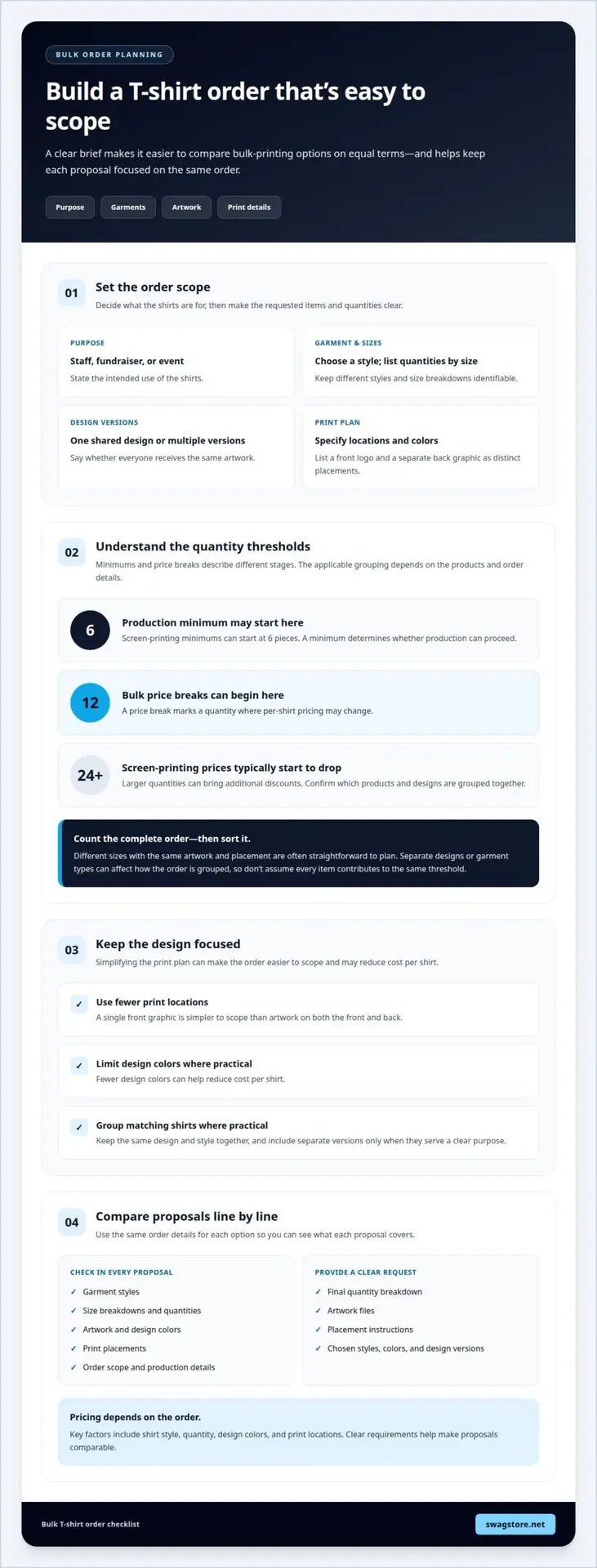
Screen-printing minimums can start at 6 pieces, while bulk price breaks can begin at 12 shirts. These thresholds describe different stages: a minimum determines whether production can proceed, while a price break marks a quantity where per-shirt pricing may change.
For planning, count the shirts in the complete order, then sort them by style, color, and design. A group ordering 12 shirts with one shared design has a clear quantity to evaluate. Separate designs or garment types can affect how the order is grouped, so don’t assume every item automatically contributes to the same threshold.
Different sizes are often straightforward to plan when the artwork and placement stay the same. For example, an order can include small, medium, and large shirts with one shared graphic. List the quantity for each size, then confirm the total and applicable pricing for the selected product.
Styles require closer attention. A crew-neck shirt and a different garment style may not be treated as one identical item, even if both carry the same artwork. Screen-printing prices typically start to drop at orders of 24 or more shirts, and larger quantities can bring additional discounts. The relevant quantity depends on which products and designs are grouped together, not simply the number of people receiving shirts.
To keep the order easy to price, settle on the artwork first, then list sizes and styles separately. For a consistent group look, explore custom screen-printed T-shirts and organize the required quantities by size.
When comparing bulk printing options, match the garment style, artwork, print locations, and quantities. Share the same details for each option so you can compare proposals on equal terms. For full-color printing on T-shirts in bulk, clear requirements make it easier to judge what each order includes.
Start with the purpose, whether the shirts are for staff, a fundraiser, or an event. Choose the garment style, list quantities by size, and decide whether everyone will use one design or different artwork versions. Specify print locations and colors. For example, list a front logo and separate back graphic as two placements so the full design is reflected in the order. This makes a bulk full-color T-shirt printing request easier to scope accurately.
Keep the design focused. Fewer print locations and design colors can help reduce cost per shirt. A single front graphic, for example, is simpler to scope than artwork on both the front and back. Group shirts with the same design and style where practical, and avoid adding separate versions unless they serve a clear purpose.
Pricing depends on the order and is provided after a quote request; key factors include shirt style, quantity, design colors, and print locations. Organizations can plan related branded items, such as stationery or tech accessories, as part of an event or employee program. Keep each item’s purpose and intended audience clear.
Compare proposals by checking garment styles, size breakdowns, artwork, colors, and print placements line by line. Make sure the order scope and production details are clear, so you can see what each proposal covers. For repeat designs across an organization’s apparel order, ask about screen printing.
Send the final quantity breakdown with the artwork files and placement instructions. A complete request gives the order a clear scope and helps you choose the shirts and printing approach that fit your organization.
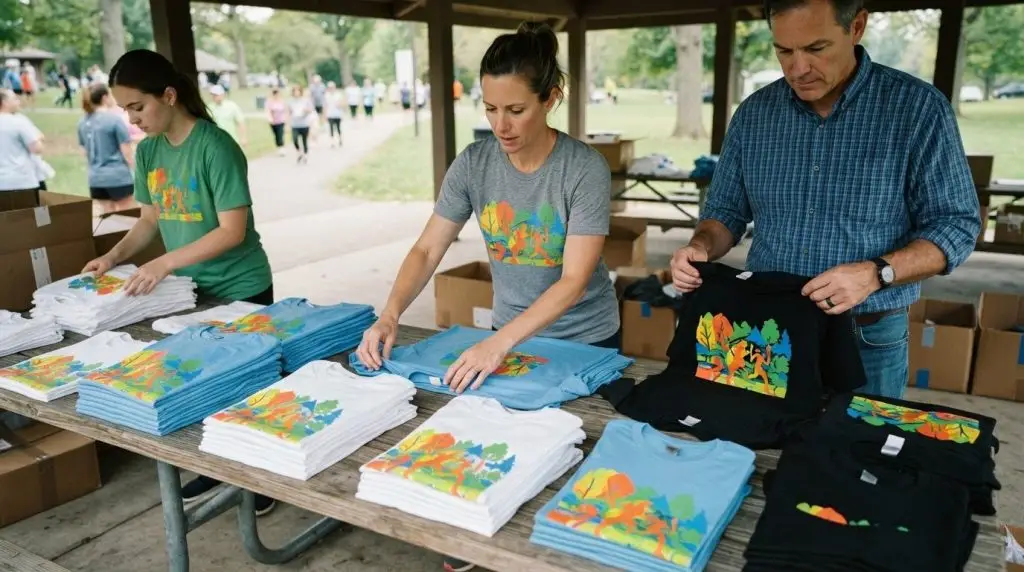
Fabric and garment color affect how artwork looks on a finished shirt. A detailed landscape, for example, may need a different background choice from a simple logo. Consider the design, fabric, and shirt color together rather than choosing each separately.
A typical 100% cotton T-shirt weighs 4.5-6.1 oz. That range offers a useful reference when comparing cotton options, but weight alone doesn’t determine how a print will look. Fabric texture and composition also affect the surface beneath the artwork. A smooth-looking graphic and fine details may read differently across distinct fabric types.
Shirt color changes the contrast between the garment and the design. On a light shirt, dark outlines can help separate image details from the background. Bright artwork may stand out on a dark shirt, while dark elements can become hard to distinguish. Preview a colorful logo on both light and dark shirt colors before choosing a palette.
Full-color artwork can include photographs, several hues, and fine transitions. Check that those details remain visible at the intended print size. Small text and thin lines may lose clarity when reduced, whatever the fabric. Review a garment preview for contrast, legibility, and any conflict between the shirt color and important design elements.
Choose the artwork first, compare fabric options, then assess shirt colors against the design. For a consistent group look, use the same fabric and color across styles where possible. If the order needs different garment colors, review each version separately to make sure the artwork stays readable.
For an organization planning branded apparel, custom screen-printed T-shirts offer a way to bring a shared design onto garments. Explore custom screen-printed T-shirts as you decide which fabric and color best support your artwork.
SwagStore.NET helps organizations turn a shared design into custom screen-printed T-shirts for teams, events, and branded programs. Bring your artwork, garment preferences, size breakdown, and placement choices together to shape an order around your group. That preparation makes it easier to align the finished shirts with your intended look and use.
For coordinated employee or event merchandise, pair custom T-shirts with embroidered Nike and Under Armour polos, branded YETI and Stanley tumblers, or custom logo power banks and tech accessories. Choose products that suit the audience and occasion rather than adding items without a clear purpose.
Have a bulk apparel project in mind? Contact SwagStore.NET to discuss your custom T-shirt order.
Think beyond the shirt’s first use. A well-planned design can help employees, event teams, and customers recognize your organization wherever they wear it. Before moving ahead with full-color printing on T-shirts in bulk, decide what you want the artwork to communicate and how it should feel to the people wearing it. That direction can guide choices across your branded merchandise, from a bold event graphic to a more understated team look.
Bring the practical details together: your audience, garment preferences, artwork, and quantity breakdown. A clear brief gives the order a stronger starting point and helps align the finished apparel with your organization’s identity. It also helps you consider how branded apparel fits into an employee or event experience while keeping the T-shirts at the center of the project.
Ready to shape your order? Contact SwagStore.NET about bulk printing and take the next step toward apparel that reflects your brand with purpose. Let your design make a memorable impression.
Standard production typically takes a few business days after artwork approval. A large order’s schedule also depends on its quantity, number of designs, and print placements. For an event or campaign, allow time for artwork revisions before approval and coordinate distribution around the production schedule. The production period begins after approval, not when you first start preparing the order.
Screen printing, direct-to-garment (DTG), and direct-to-film (DTF) are different methods for applying artwork to shirts. Screen printing uses prepared screens to apply ink, while DTG prints directly onto the garment. DTF prints the design onto transfer film before it is applied to the shirt. The design, fabric, quantity, and desired finish help determine which approach to consider.
The per-shirt price depends on the specific order and is provided after a quote request. Key cost factors include garment style, total quantity, number of print locations, and artwork colors. A useful quote request describes each factor clearly. For example, specify whether every shirt uses the same front design or whether some need a different placement.
Screen printing has a minimum order of 6 pieces, while bulk pricing breaks can begin at 12 shirts. Those thresholds serve different purposes: the minimum relates to starting screen-print production, and a pricing break relates to quantity. For example, a group planning 12 shirts should provide its size breakdown and shared design when requesting a quote.
Screen printing applies ink through prepared screens, DTG prints directly on the shirt, and DTF transfers a film-printed design onto the garment. Compare the methods in relation to your artwork, fabric, quantity, and intended use. A repeated design across a group may suit a screen-printing order, while intricate artwork may be worth discussing in relation to direct printing or transfer options.
File requirements vary with the design and printing process, so provide the clearest available source artwork. Vector files can preserve clean edges for scalable logos; a high-quality raster image may suit photographic designs. Include a preview of the intended colors and placement, and make sure text is legible at the planned print size. Avoid relying on a small screenshot as the only source file.