
A welcome kit should feel useful from day one, not like a box of leftover promo items. It’s a curated collection of branded items and practical tools for a new employee, often built around five to seven useful pieces. Personalized tech kits for new employees make that first impression more functional by pairing everyday work essentials with thoughtful brand details.
A welcome gift should feel personal and suit the way someone works. The challenge is choosing items that fit your budget and team without adding clutter or hard-to-use gadgets. A focused kit can still feel polished: every piece has a purpose, and together they create a clear sense of welcome.
This guide explains how to shape welcome kits for different budgets and teams, choose tech-themed gifts with practical value, and avoid common missteps. Use these criteria to build a considered welcome experience rather than a generic collection of gifts.
A welcome kit makes onboarding tangible, pairing useful items with a clear message of belonging. Consider a branded notebook, a reusable tumbler, and a welcome card from the team. Each piece should reflect company culture while serving a purpose beyond displaying a logo.
Build the onboarding kit around five to seven useful items, rather than filling a box with random merchandise. Six well-chosen pieces could include a notebook, a pen, a water bottle, and work-ready accessories. In 2026, welcome-kit guidance favors smaller, purpose-built selections over piles of branded extras. A focused collection also makes the unboxing feel considered.
How do companies choose between preconfigured tech kits and employee-selected equipment? Choose a preconfigured kit when employees in similar roles share needs, such as a standard desk setup. Offer choices when teams use different devices or work styles, and let each person select from options that meet company requirements.
Branded apparel can bring a team together, but comfort and fit matter more than logo placement. Offer a choice of styles and sizes, such as a T-shirt or polo, so employees can select something they’ll wear. Collect size preferences before ordering; if that’s not practical, choose non-apparel items instead.
Personalize a kit with a name on a notebook or a welcome card signed by a manager. Adding a team or department detail makes the message more relevant, especially for hybrid hires who may not meet colleagues in person right away. A QR code can also link to a welcome video or the team’s Slack channel.
What security and privacy risks should companies consider when personalizing employee devices? Avoid printing personal details or access credentials on devices, packaging, or labels, where they could be seen or lost. Keep branding separate from login information, and use a welcome card for personal messages.
Before packing, match each item to a real onboarding task: a notebook for orientation notes, for example, or a charger for a mobile role. This simple check keeps branded merchandise useful and the welcome message consistent.
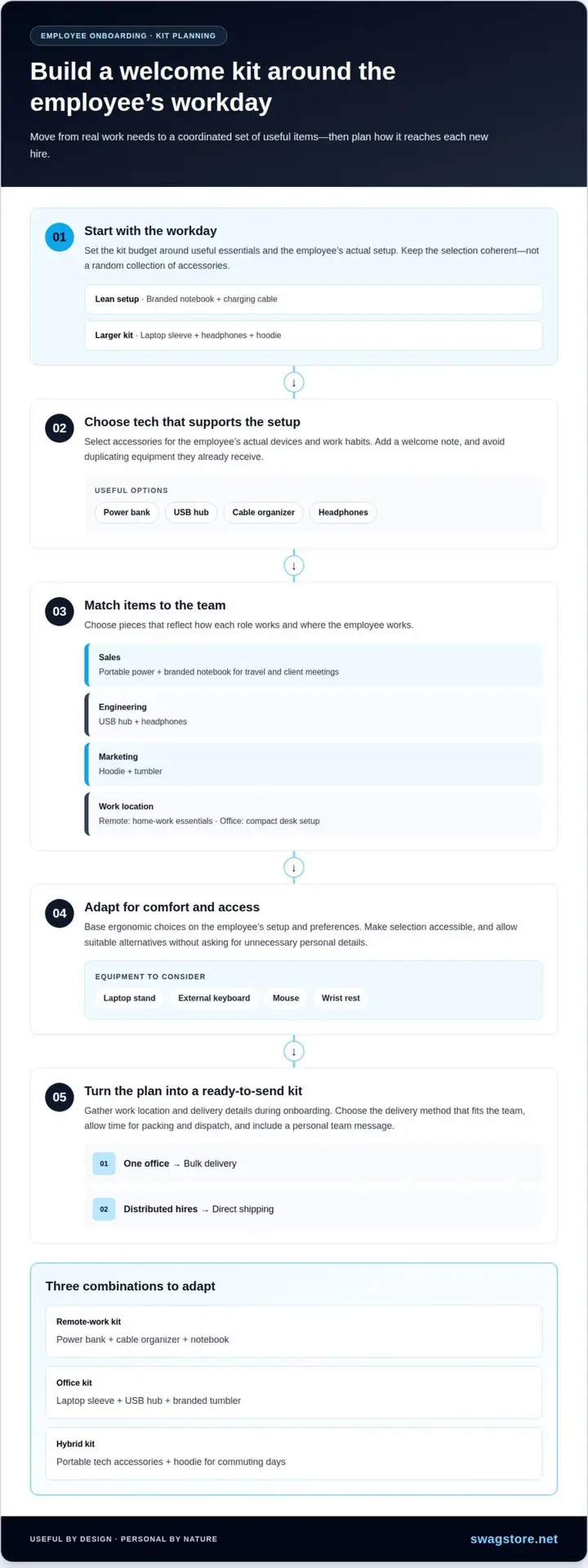
Start with the employee’s workday, then set the welcome-kit budget around useful essentials. A lean setup might pair a branded notebook with a charging cable; a larger kit could add a laptop sleeve, headphones, and a hoodie. Keep the selection coherent so accessories feel intentional, not randomly collected.
What should a personalized technology kit for a new employee include? Choose accessories that support the employee’s actual setup, such as a power bank, USB hub, cable organizer, or headphones. Add a welcome note, and avoid duplicating equipment they already receive.
For sales teams, portable power and a branded notebook can support travel and client meetings. Engineering hires may benefit from a USB hub and headphones, while marketing teams could use a hoodie and tumbler. Remote employees need home-work essentials; office-based hires may prefer a compact desk setup.
What accessibility and ergonomic equipment should employee tech kits offer? Consider a laptop stand, external keyboard, mouse, or wrist rest, based on the employee’s setup and preferences. Make the selection process accessible, and let employees request suitable alternatives without disclosing unnecessary personal details.
Try a remote-work combination of a power bank, cable organizer, and notebook. For an office hire, pair a laptop sleeve with a USB hub and branded tumbler. A hybrid kit can combine portable tech accessories with a hoodie for commuting days. These examples are easy to adapt for different teams.
Plan logistics alongside the contents. Gather work location and delivery details during onboarding, then choose bulk delivery for one office or direct shipping for distributed hires. Leave time for packing and dispatch, and include a team message that makes the welcome feel personal. Explore custom logo power banks and tech accessories as practical options for a coordinated kit.
A welcome kit loses value when its contents create extra work. Skip gadgets that require technical setup, software installation, or account creation before use. A plug-and-play cable, for example, is simpler on day one than a device that needs configuration. Keep onboarding focused on access, role training, and people, not troubleshooting a gift.
Check every item against the employee’s actual work setup. A laptop sleeve that doesn’t fit their device or a cable with an incompatible connector quickly becomes clutter. Identify the equipment employees use, then choose accessories that work with it. A compatibility checklist can prevent mismatched items in onboarding kits.
Quality matters most for items employees handle often. Check a sample tumbler for a secure lid, comfortable grip, and easy cleaning; review a notebook for sturdy binding and paper suited to everyday notes. Avoid drinkware that’s difficult to carry and accessories that seem fragile. A smaller set of dependable items is more useful than a box of disposable-feeling merchandise.
Consider the recipient before adding apparel or personal-use gifts. A hoodie in the wrong size may stay in the closet, while a strong scent or highly specific design may not suit everyone. When preferences vary, choose neutral, practical essentials and keep branding clear but proportionate. This helps the kit feel considered, not obligatory.
Before packing, test each item’s basic function, inspect its finish, and make sure its instructions are clear. Remove products that need lengthy setup or duplicate standard equipment. For example, replace a complicated desk gadget with a useful tumbler or notebook. Every item should support onboarding without making the first days more complicated.
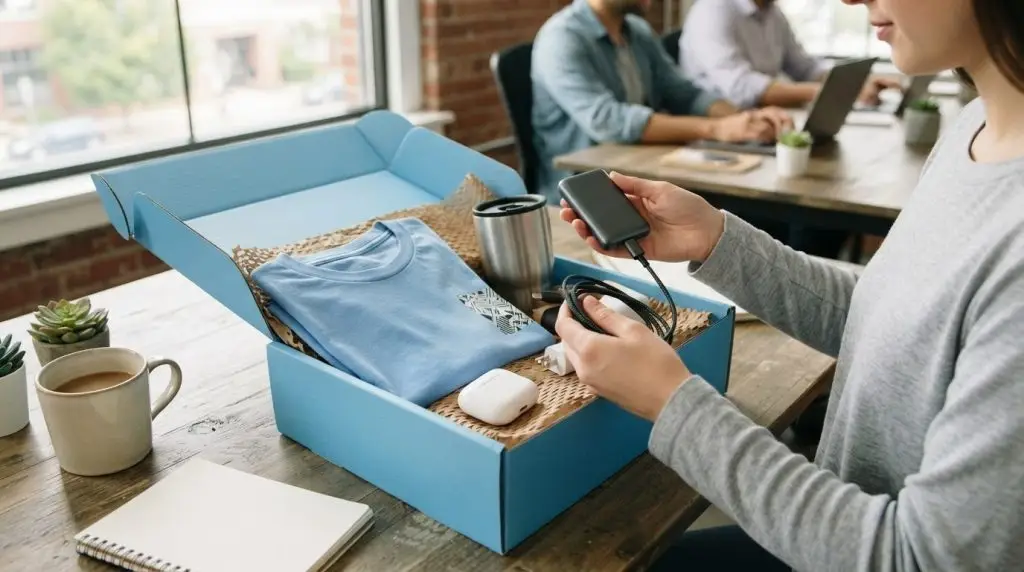
A strong tech-themed kit connects digital work with thoughtful everyday essentials. Personalized tech kits for new employees work best when they meet a clear need, such as charging during travel or keeping notes organized. Start with one useful technology accessory, then add items for travel, note-taking, or a comfortable workday. A cable organizer, notebook, and water bottle, for example, make a practical set without turning the welcome into a box of gadgets.
Choose accessories for a clear use case. A travel-focused combination might pair a power bank with a cable and compact notebook. A desk-oriented kit could include a USB hub, a planning notebook, and a bottle for daily use. Make sure each item suits employees’ work setups, and avoid devices that require complicated setup.
Small design choices can make a kit feel cohesive. Coordinate the colors of notebooks, apparel, and packaging, while keeping logos visible without making them overwhelming. A charging cable with six connectors, made with recycled aluminum and recycled plastic, is one example of combining utility with material-conscious design. Confirm that any accessory fits the employee’s devices before including it.
A premium kit doesn’t need more items. Choose a few well-made pieces employees can use repeatedly, such as a durable notebook, a travel-ready bottle, and a practical tech accessory. For hybrid teams, prioritize portable items that move easily between home and office. A thoughtful welcome note can connect those useful objects to team culture.
Before assembling a tech-themed employee kit, match each item to a real task: charging during travel, taking meeting notes, or carrying water between workspaces. Remove anything that duplicates standard equipment or adds setup steps. This simple filter keeps the collection purposeful, polished, and easy to use from the first week. It also helps personalized tech kits for new employees feel relevant to the work ahead.
Ready to shape a coordinated welcome experience? Explore employee onboarding gift kits to bring practical tech accessories and branded essentials together.
SwagStore.NET helps teams bring practical branded gifts together for employee welcomes. Its offerings are a fit when you’re assembling onboarding kits with useful tech accessories, apparel, or drinkware.
For a tech-centered kit, pair custom logo power banks and tech accessories with a branded YETI or Stanley tumbler. Add a custom screen printed T-shirt or an embroidered Nike or Under Armour polo for a wearable team element. Choose items to suit employees’ work routines, and keep the branding consistent across the kit.
A considered mix can make a welcome feel polished without filling the box with unnecessary items. Contact SwagStore.NET to discuss branded options for your employee welcome kits.
Use your next onboarding cycle to make welcome gifts a deliberate part of the employee experience. Choose a visual direction, decide which details should feel personal, and keep the team’s brand recognizable without letting logos overpower usefulness. A simple internal guide can help your team make consistent choices as roles and work arrangements change.
Personalized tech kits for new employees can evolve with feedback. After each onboarding cycle, note which items new hires use and which stay packed away. Use those observations to refine the mix for the next group instead of repeating choices by habit.
SwagStore.NET offers Custom Screen Printed T-Shirts, Embroidered Nike and Under Armour Polos, and Branded YETI and Stanley Tumblers for branded welcome experiences. Contact SwagStore.NET about welcome kits and take the next step toward a thoughtful first-day experience.
An employee welcome kit combines practical items and information to help a new hire settle into the workplace. It might include a team directory, an overview of communication channels, and a note explaining where to find onboarding resources. For remote employees, include digital copies of key documents so important details are accessible without printed materials.
Start by listing what a new hire needs in their first days, then choose branded items that complement the experience. SwagStore.NET offers Employee Onboarding Gift Kits to bring selected merchandise together for a coordinated welcome. For example, pair useful accessories with a message from the hiring manager for a package with both practical value and a personal touch.
A custom onboarding kit is tailored to an organization’s identity and the experience it wants new employees to have. Coordinated branding, a relevant welcome message, or items selected for a particular team can make it personal. Personalized tech kits for new employees can also reflect role-specific workflows, as long as each accessory suits the equipment they’ll use.
Keep passwords, account details, and private employee information off gifts and packaging. Share security instructions through the company’s approved onboarding channels, not on a tumbler or printed card that could be misplaced. Leave out accessories that duplicate equipment already assigned by IT, too. This keeps the welcome package focused on gifting, not sensitive information or operational materials.
Kit costs depend on the items selected, branding approach, order quantity, and preparation for delivery. A set with a few everyday accessories will cost differently from one with several premium pieces. Plan personalized tech kits for new employees by setting a budget first, then prioritizing items that support the role rather than adding extras for appearance.
The right equipment depends on the employee’s job, required software, and approved workplace setup. IT should select core devices such as laptops and monitors; a welcome kit can add complementary peripherals such as a keyboard, mouse, or laptop sleeve. When determining standard machine specifications, hardware guides from suppliers like HGC Technologies UK Ltd. offer useful comparisons across popular business laptop brands. For example, the organization may prioritize display needs for a designer, while a traveling employee may benefit more from portable accessories.